chdb Postgres Extension
=======================
[](https://badge.fury.io/pg/chdb)
[](https://github.com/ClickHouse/pg_chdb/actions/workflows/ci.yml)
Description
-----------
This library provides PostgreSQL extensions for executing [chDB] queries in
Postgres, and for copying data from external sources into a PostgreSQL table.
### chdb Extension
The `chdb` extension runs [chDB] queries. The `chdb_query()` function executes
a single query. For example, this query:
```sql
SELECT * FROM chdb_query($$
SELECT * FROM s3('s3://datasets-documentation/my-test-bucket-768/some_prefix/some_file_1.csv')
$$) AS (id int, months int, days int);
```
Outputs:
```
id | months | days
----+--------+------
1 | 2 | 3
3 | 2 | 1
4 | 5 | 6
(3 rows)
```
See the [chdb documentation](doc/chdb.md) for details.
### chdb_hook Module
The `chdb_hook` module hooks into the [COPY] command to copy data to or from
an S3, GCS, Azure Blob, file, or http URL. This example loads records from
multiple CSV files on S3 in a single [COPY] command:
```sql
CREATE TABLE times (
id INT NOT NULL,
months INT NOT NULL,
days INT NOT NULL
);
LOAD 'chdb_hook';
COPY times FROM 's3://datasets-documentation/my-test-bucket-768/{some,another}_prefix/some_file_{1..3}.csv';
```
After which the `times` table contains the records from each file it loaded:
```pgsql
# SELECT * FROM times;
id | months | days
----+--------+------
1 | 2 | 3
3 | 2 | 1
4 | 5 | 6
1 | 2 | 3
3 | 2 | 1
4 | 5 | 6
1 | 2 | 3
3 | 2 | 1
4 | 5 | 6
1 | 2 | 3
3 | 2 | 1
4 | 5 | 6
1 | 2 | 3
3 | 2 | 1
4 | 5 | 6
1 | 2 | 3
3 | 2 | 1
4 | 5 | 6
(18 rows)
```
A [CREATE TABLE] may also derive its columns, and load its rows, from such a
URL:
```sql
CREATE TABLE reviews () WITH (
copy_from = 'https://datasets-documentation.s3.eu-west-3.amazonaws.com/amazon_reviews/amazon_reviews_2015.snappy.parquet'
);
```
See the [chdb_hook documentation](doc/chdb_hook.md) for details.
Benchmarking Formats
--------------------
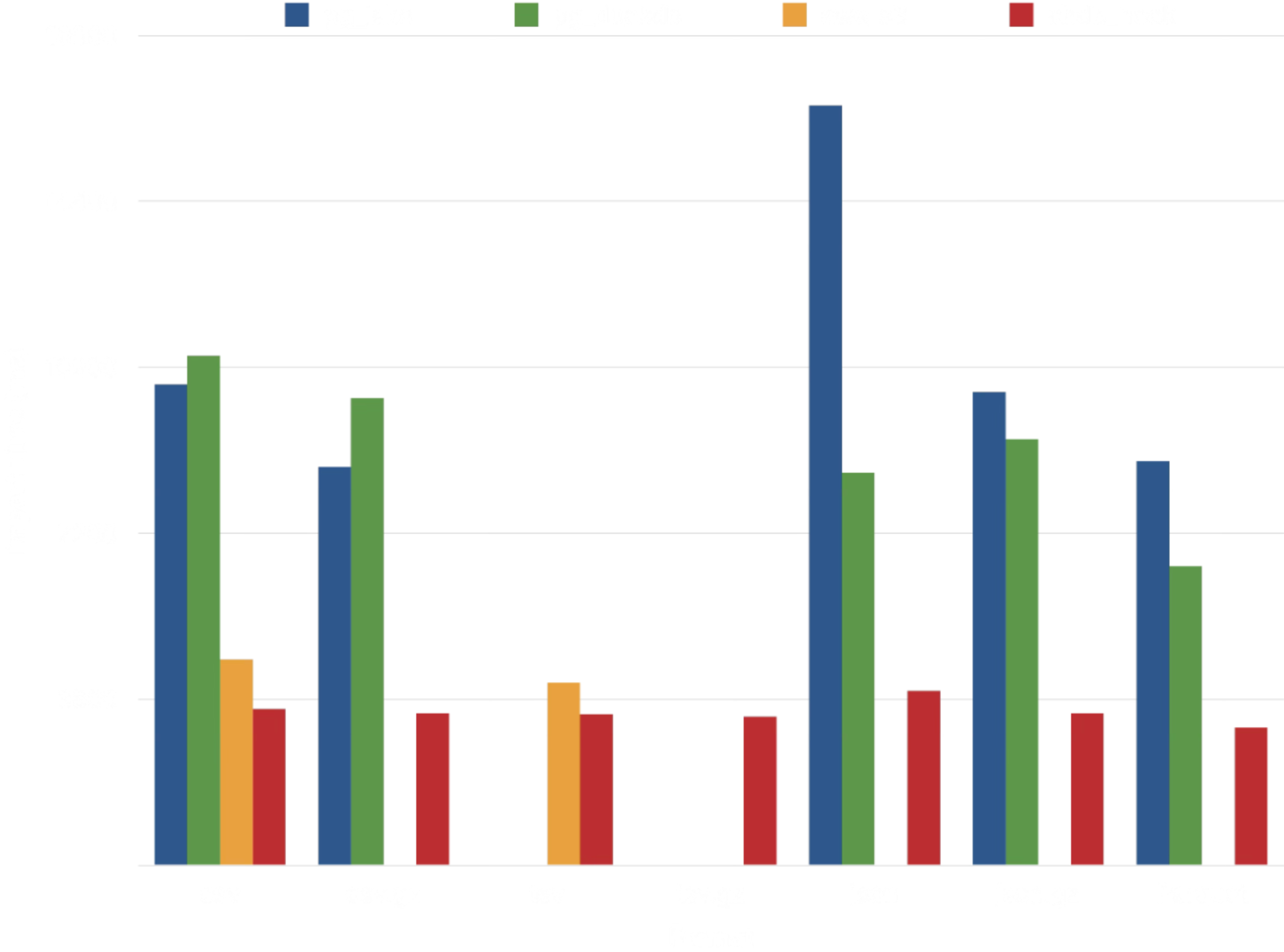
The contents of [dev/benchmark](dev/benchmark/) compare the performance of
[chdb_hook] `COPY` to that of [aws_s3], [pg_duckdb], and [pg_lake] for ca. 1m
rows of [NYC Taxi dataset] in a variety of formats.
Of the four extensions, [chdb] exhibits the most consistent performance.
[pg_duckdb] and [pg_lake], both backed by [DuckDB], take around 2-3x as long
to import data from CSV, JSON, and Parquet. Only [aws_s3] approaches
[chdb_hook]'s performance, but it supports a much more limited array of data
formats:
| Extension | Compression | Data Formats
| --------- | ------------------------------------ | -------------------------------- |
| aws_s3 | none | Text (TSV), CSV, Postgres Binary |
| pg_lake | gzip, zstd, snappy (Parquet only) | CSV, JSON, Parquet |
| pg_duckdb | gzip, zstd, snappy (Parquet only) | CSV, JSON, Parquet |
| chdb | tzip, zstd, lz4, bz2, snappy, brotli | TSV, CSV, JSON, BSON, Prometheus, Protobuf, Avro, Parquet, Arrow, XML, CapnProto, Markdown, MsgPack, ORC, and [more][formats]! |
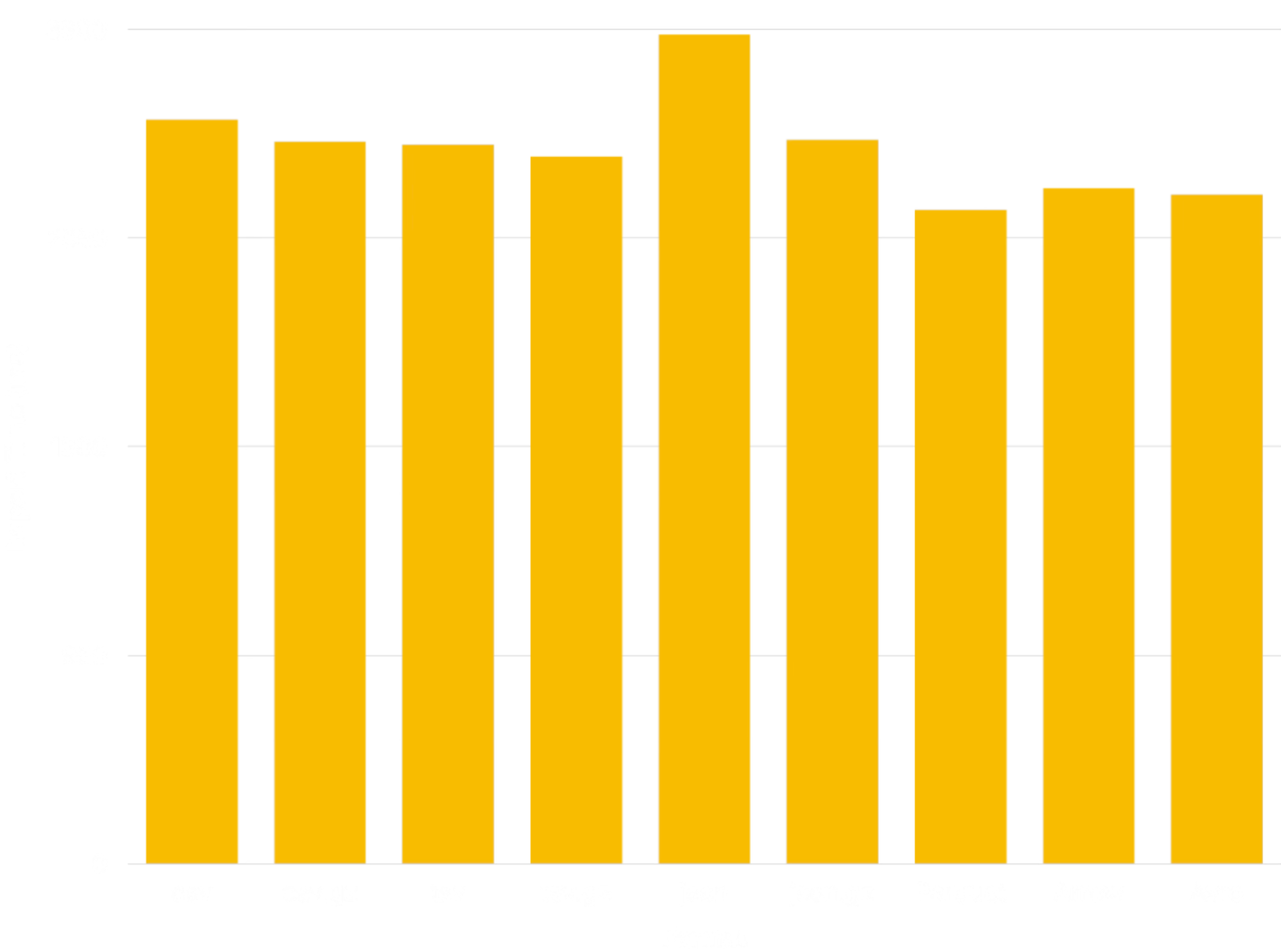
Additional benchmarking demonstrates relatively consistent performance
importing the [NYC Taxi dataset] in a variety of formats:
The benchmark uses the [JSONCompact] format for compatibility with the other
extensions; Other JSON formats, such as [JSONCompactEachRow], will more
closely approximate the performance of the other formats.
Architecture
------------
The chdb and chdb_hook extensions rely on a `chdb_helper` process to execute
[chDB] queries. The helper keeps the resource consumption of [chDB] separate
from the main Postgres process, an advantage for an occasionally-used workflow
such as loading data from a data lake.
```
+-------------+
| helper |
+----------+ | app | +------+
| Postgres | | +---------+ | | chDB |
| Backend |----->| | chDB | |----->| Data |
+----------+ | | Library | | +------+
| +---------+ |
+-------------+
```
Unlike a background worker, the helper holds no Postgres shared memory and the
postmaster does not manage it. This isolates crashes from affecting Postgres.
A helper that dies triggers an error only in the backend that started it,
leaving other sessions untouched.
> [!IMPORTANT]
> For each query, the helper connects to a temporary chDB database on disk to
> execute it. As a consequence, each query currently runs in complete
> isolation from all other queries. Don't create a table and expect to query
> it in a subsequent query.
Dependencies
------------
The `chdb` extension requires PostgreSQL 15 or higher and the [chDB] library
v26.7.0 or greater (currently available only for Linux and macOS). The
simplest way to install it is via the [lib.chdb.io] shell script:
```sh
curl -sL https://lib.chdb.io | bash
```
To statically compile [chDB] into the helper app, set the following variables
before running the [Installation](#installation) `make` commands.
```sh
export BUNDLE_LIBCHDB=1 LIBCHDB_BUILD=static
```
The `Makefile` will download the static `libchdb` library and compile it into
the app.
On Linux, you can also have the installation process download and install the
dynamic `libchdb` library by setting `export BUNDLE_LIBCHDB=1` before running
the [Installation](#installation) `make` commands.
Installation
------------
To build chdb, just do this:
``` sh
make
make installcheck
make install
```
If you encounter an error such as:
```
"Makefile", line 8: Need an operator
```
You need to use GNU make, which may well be installed on your system as
`gmake`:
``` sh
gmake
gmake install
gmake installcheck
```
If you encounter an error such as:
```
make: pg_config: Command not found
```
Be sure that you have `pg_config` installed and in your path. If you used a
package management system such as RPM to install PostgreSQL, be sure that the
`-devel` package is also installed. If necessary tell the build process where
to find it:
``` sh
env PG_CONFIG=/path/to/pg_config make && make installcheck && make install
```
If you encounter an error such as:
```
chdb_helper.c:22:10: fatal error: 'chdb.h' file not found
```
You either need to install [chDB] or tell the compiler where to find it. If,
for example, you installed it via the [lib.chdb.io] shell script, point to
`/usr/local`:
``` sh
make CFLAGS=-I/usr/local/include \
LDFLAGS=-L/usr/local/lib
```
If you encounter an error such as:
```
ERROR: must be owner of database regression
```
You need to run the test suite using a super user, such as the default
"postgres" super user:
``` sh
make installcheck PGUSER=postgres
```
To install the extension in a custom prefix on PostgreSQL 18 or later, pass
the `prefix` argument to `install` (but no other `make` targets):
```sh
make install prefix=/usr/local/extras
```
Then ensure that the prefix is included in the following [`postgresql.conf`
parameters]:
```ini
extension_control_path = '/usr/local/extras/postgresql/share:$system'
dynamic_library_path = '/usr/local/extras/postgresql/lib:$libdir'
```
Authors
-------
* [David E. Wheeler](https://justatheory.com/)
* [serprex](https://github.com/serprex)
Copyright
---------
Copyright (c) 2026, ClickHouse
[chDB]: https://clickhouse.com/chdb
"chDB - fast, reliable, and scalable in-process database"
[COPY]: https://www.postgresql.org/docs/current/sql-copy.html "Postgres Docs: COPY"
[CREATE TABLE]: https://www.postgresql.org/docs/current/sql-createtable.html
"Postgres Docs: CREATE TABLE"
[lib.chdb.io]: https://lib.chdb.io "curl -sL https://lib.chdb.io | bash"
[`postgresql.conf` parameters]: https://www.postgresql.org/docs/devel/runtime-config-client.html#RUNTIME-CONFIG-CLIENT-OTHER
[chdb_hook]: https://pgxn.org/dist/chdb/doc/chdb_hook.html "chdb_hook Docs on PGXN"
[aws_s3]: https://docs.aws.amazon.com/AmazonRDS/latest/UserGuide/USER_PostgreSQL.S3Import.html
"Importing data from Amazon S3 into an RDS for PostgreSQL DB instance"
[pg_duckdb]: https://github.com/duckdb/pg_duckdb "DuckDB-powered Postgres for high performance apps & analytics"
[pg_lake]: https://github.com/Snowflake-Labs/pg_lake "pg_lake: Postgres with Iceberg and data lake access"
[formats]: https://clickhouse.com/docs/reference/formats/index
"ClickHouse Docs: Formats for input and output data"
[NYC Taxi dataset]: https://clickhouse.com/docs/get-started/quickstarts/tutorial
"ClickHouse Docs: Advanced tutorial"